By now, everyone can recognize the Google Analytics (GA) platform, whether they actively use it or not. It’s a free web analytics tool that has several purposes. Mainly, it allows marketers and web administrators to measure and look up information about site traffic. You can use the platform for much more than traffic monitoring, however. One incredibly underrated and underused function relates to custom dimensions.
Metrics are quantitative measurements that allow a site administrator to see general stats. Conversely, definitions can accurately segment audiences. We’ll focus on dimensions here.
Say, for example, you want to understand why people are leaving your site or why bounce rates are so high. You can build a custom dimension that details what visitors are doing before they stop interacting or navigate away. Essentially, GA custom dimensions generate more granularity in your reports, returning much more practical datasets.
Some of the most valuable attributes gleaned from visitors are what they’re doing on your site and how long they spend on it. Collectively, the insights provide you with an overview of each user’s journey.
Here are some dimensions you can use to gather these details.
While the user journey gives an understanding of what each visitor wanted, user behavior completes the picture. Many local SEO companies use metrics for identifying user behavior and how it affects their sites. Dimensions tell you what activities or events users performed and what the follow-up might have been. Perhaps they signed up for a weekly email newsletter or looked at a product description.
Here are some of the associated dimensions.
Progress and performance are good indicators of how certain elements, pages or even users are doing in terms of visitor interactions. For example, on blogs and content-heavy sites with multiple authors, it may be beneficial to track the performance of each post to gauge popularity, success and revenue generation.
The easiest option is to monitor bounce rates and views for the particular subject you wish to measure. Some people look for Google Analytics alternatives but find there’s plenty to explore without using those.
Alternate forms of performance tracking include the following.
Because it’s such an underused tool, here are some tips for implementing custom dimensions in your reports.
By default, GA will only include two dimensions in a report at a time. To see more than that, do the following.
Creating custom reports is an excellent way for everyone in your organization to focus on the chosen dimensions and what they indicate. Try this:
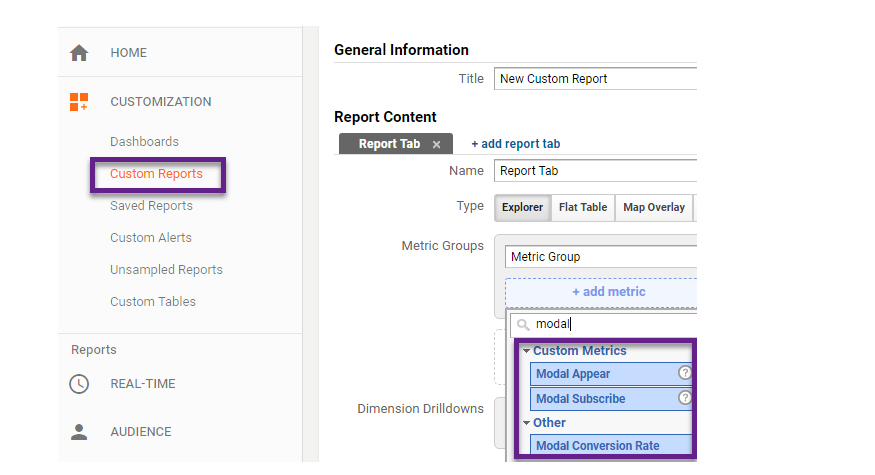
Source: https://online-metrics.com/custom-metrics/
You can then make a New Custom Report that includes your customized GA dimensions.
Google doesn’t limit you regarding the names you can pick for each custom dimension. It’s best to choose unique names you won’t confuse with other dimensions.

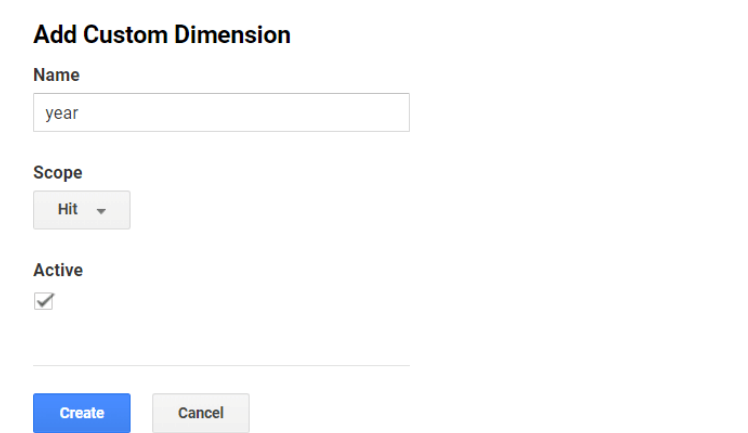
Although you can’t delete a custom dimension, Google lets you make it inactive. Do that by using the Edit option on the dimension you no longer need.
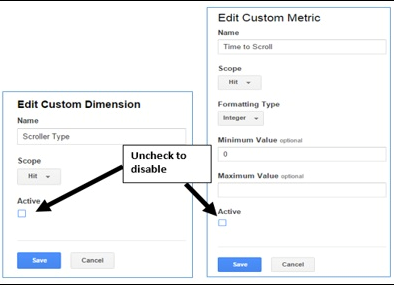
Source: https://www.optimizesmart.com/complete-guide-to-dimensions-and-metrics-in-google-analytics/
GA allows using custom metrics to figure out how many homepage visitors take part in specific actions. But, you can expand upon a metric to bring dimensions into the picture and learn more about the characteristics of your users.
Here’s a code snippet to measure the number of times they click on a particular video (shown as trailer_play in the code).
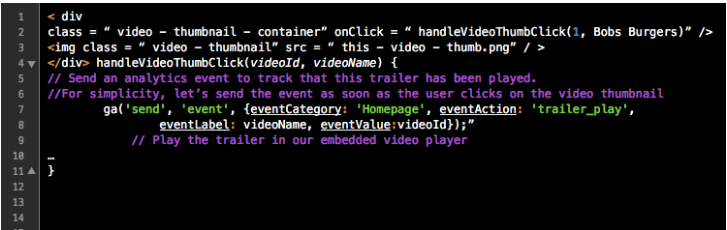
Source: https://dev.to/_robynedgar/using-google-analytics-with-custom-dimensions-and-metrics–4dij
Indeed, that’s a quantitative measurement, otherwise known as a metric. However, certain metrics can become jumping-off points for accompanying dimensions.
Consider making a complementing dimension called Video Name, for example. You could also create a User Status dimension to tell you whether the majority of people who play a certain video are registered or unregistered users.
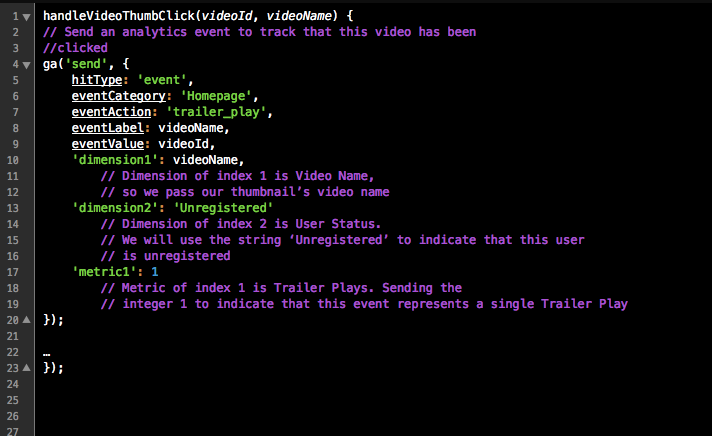
Source: https://dev.to/_robynedgar/using-google-analytics-with-custom-dimensions-and-metrics–4dij
Spend time considering which events you most want to track. Then, use the snippets above to guide your setup process.
Thanks to this guide, you can rely on GA in ways that may not have seemed possible before. Being strategic about how and when you implement custom dimensions can help you succeed.