Remember when your Android phone was brand new, running sleek and smooth? Maybe it’s been quite a few years since you last saw that kind of performance from your phone.
On average, Americans spend at least 3 hours a day on their phones. You could waste hours of your free time trying to delete apps, bloatware and tasks that are constantly running, but no one ever feels like doing that. So what’s your other option?
The answer lies in one simple phone cleaner app: Clean Master from Cheetah Mobile, which is available only for Android right now. According to the app’s official site, it’s one of the highest-rated apps in the world. On average, it can clean 340 MB of pure junk files.
When this app works its magic, you’ll be holding a phone that feels like it just came out of the box. Best of all, you’ll feel more productive when your phone is all clean.
On Clean Master’s home screen, graphs show your device’s used and free space on both the internal storage and external SD card. Inside the history tab, a cache of all of your installed apps is displayed.
You can either selectively choose which apps in the cache you want to delete, or select the general clean function that clears most of the unimportant caches.
A third tab displays residual files from apps you’ve deleted. You can delete those files with the tap of a button.
Clean Master works simultaneously as an antivirus program and a cleaner. The app protects your phone from malware and spyware from unsecure apps that can take control of core processes, and it removes junk files that take up space.
As an added bonus, an in-app task manager can be used to easily kill backgrounding apps instead of your phone’s preinstalled task manager.
Clean Master sets the bar for other cleaning apps due to its functionality. Few apps in the Google Play store match Clean Master’s wide array of options. Here’s a rundown of all the features that work together to clean your phone.
The Clean Master app’s suite of tools helps you get the most out of your Android. Using this app, you can rid your phone of junk files, free up RAM, protect yourself from harmful viruses and more. But how do these features work?
Take, for instance, one of the less self-evident tools — the junk file remover. Just like computers, phones can become clogged with unneeded files. Junk files aren’t the same as old pictures and videos. They’re typically files generated by apps and little bits and pieces left behind after uninstalling. These files take up space that you could otherwise use for better things.
Clean Master’s junk remover works to free up space by scanning your phone for the unnecessary files and letting you select what ones to remove. Think of it as dusting off your phone’s storage space. Chances are there’s a lot of junk — and dust — that you don’t even know about taking up space!
Clean Master’s CPU booster is another of its amazing features. You can navigate to these tools by tapping the Storage and Ram buttons from the home screen. This program scans the apps running on your phone and closes the ones you’re not using, freeing up memory.
Even better, you can set up the app to automatically clean your Ram, without even using a widget! To do this, open the memory boost screen and bring up the options menu. Tap the Auto Kill setting, and switch on the Kill tasks as screen turnoff option. And that’s it! This will kill any running tasks — except those you put on an ignore list — when you turn your screen off.
The booster feature is particularly great if you’re an avid Android gamer. Because the tool closes background tasks that you’re not using, it frees up memory for you game. This reduces stuttering and immensely improves performance.
Working in conjunction with the booster, you can use Clean Master’s task manager to really manage your phone by uninstalling bloatware and backing up the data from important apps.
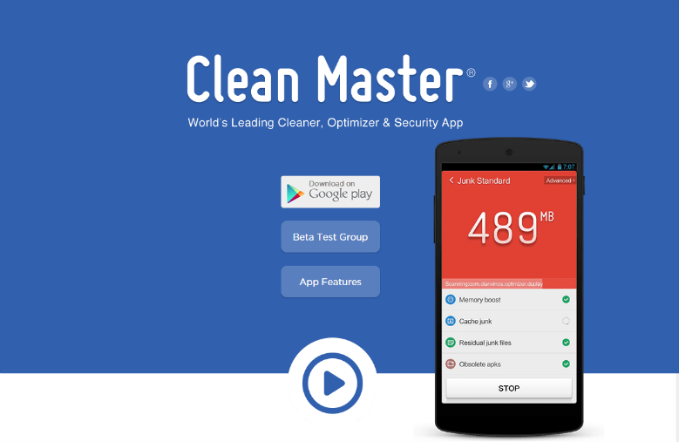
Finally, use Clean Master’s antivirus features to keep your phone — and privacy — safe from malware and security issues. When scanning your phone, the app looks at your other installed apps and programs, external SD card and other items for security concerns. Once done, Clean Master summarizes the threats it found and allows you to take care of them one at a time or bulk resolve them.
As with the CPU booster, you can schedule scans to keep your phone safe. To do this, go to the scan settings and turn on Schedule Scan and Safe Browsing. The first option tells the app to scan your phone at predetermined times. The browsing protection works like you computer’s antivirus and keeps you safe while you’re surfing the net. Since 80 percent of internet users access the web from their phones, you need all the safety you can get.
I’ve been using the Clean Master app myself now for roughly four years, and I’ve never once experienced any kind of ransomware or spam from it.
Now, the app is free, so it does include ads — some of which occasionally employ a sense of urgency to get you to use them, which is one thing I will say is a pitfall of the app. But overall I’m willing to accept this for the services the app provides.
I say yes: With the Clean Master app, you can accomplish more. The antivirus component will keep your phone safe from harmful viruses. When you remove junk files and use the memory boost function, your phone will run faster and more efficiently. The task manager will allow you to terminate any apps that constantly bog down your phone.
So what does this mean for you, dear user? It means you’ll be able to store more songs, photos and videos. You’ll be able to play games for a longer amount of time and with less lag. Most importantly, your battery life will be saved, so you can spend more time writing, reading, watching movies or taking care of work – all on a speedy, clutter-free phone.