

Artificial Intelligence (AI) models have become specialized, with clear differences in how they handle reasoning, coding and content creation. You might find one model excels at solving complex problems, while another produces stronger copy or helps you write code faster.
Choosing the most capable model overall does not always give you the best results for every task. By comparing the best AI models based on their strengths and ideal use cases, you can match each workload with the right tool and get more value from AI.
AI performance depends partly on model architecture and access to tools such as web search, code execution or external data. These differences shape how well a model can retrieve information and complete specialized tasks. Speed also introduces risks because factual errors or embedded biases can spread at a scale and velocity that were previously unimaginable.
You may also face trade-offs between speed, accuracy and depth of reasoning. A fast model can handle routine questions efficiently, while complex analysis may benefit from deeper reasoning and stronger verification. Matching the model to your workload helps you prioritize the right capabilities instead of relying on one AI system for everything.
Different AI models excel at different workloads, so your ideal choice depends on what you want to accomplish. The following options highlight leading models for tasks ranging from complex reasoning and coding to content creation and multimodal work.
GPT-5.6 Sol is among the best AI models for multistep reasoning and complex professional tasks. Sol is OpenAI’s latest model, which focuses on reasoning problems and agentic tasks that previously required constant human check-ins. You can use it to work through complex problems that involve multiple stages, decisions and sources of information.
Its versatility also extends across writing and coding. A broad tool ecosystem can help you move beyond text generation by working with files, searching for information, analyzing data and interacting with other tools. This combination makes Sol useful when your task requires several capabilities within one workflow.
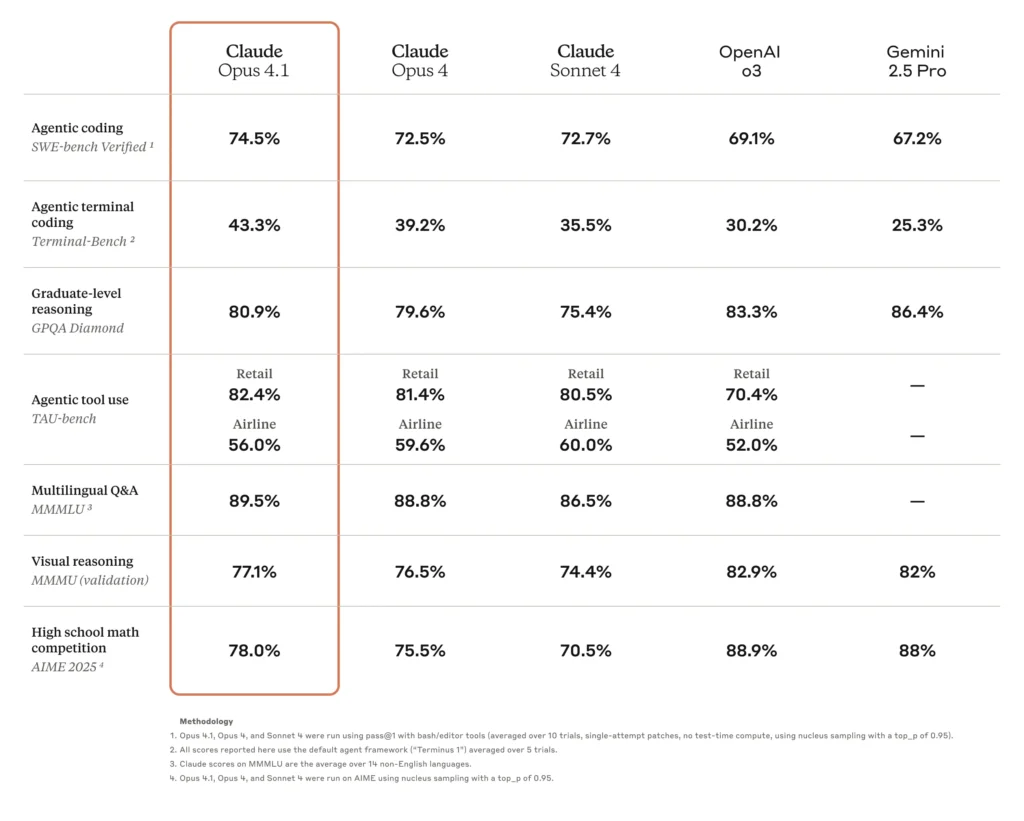
Claude Opus 4.1 can work through lengthy documents while maintaining context across detailed, interconnected tasks. It emphasizes multistep reasoning and structured problem-solving, making it especially effective for technical and research-focused applications. You can use these capabilities to analyze complex information without losing sight of earlier details and instructions.
Claude also works well for summarizing reports, analyzing source material and producing polished long-form content. If you regularly work with research papers or extensive reference materials, its document-handling capabilities can streamline your workflow. Knowledge workers may prioritize Claude when their work demands careful analysis across large amounts of text.
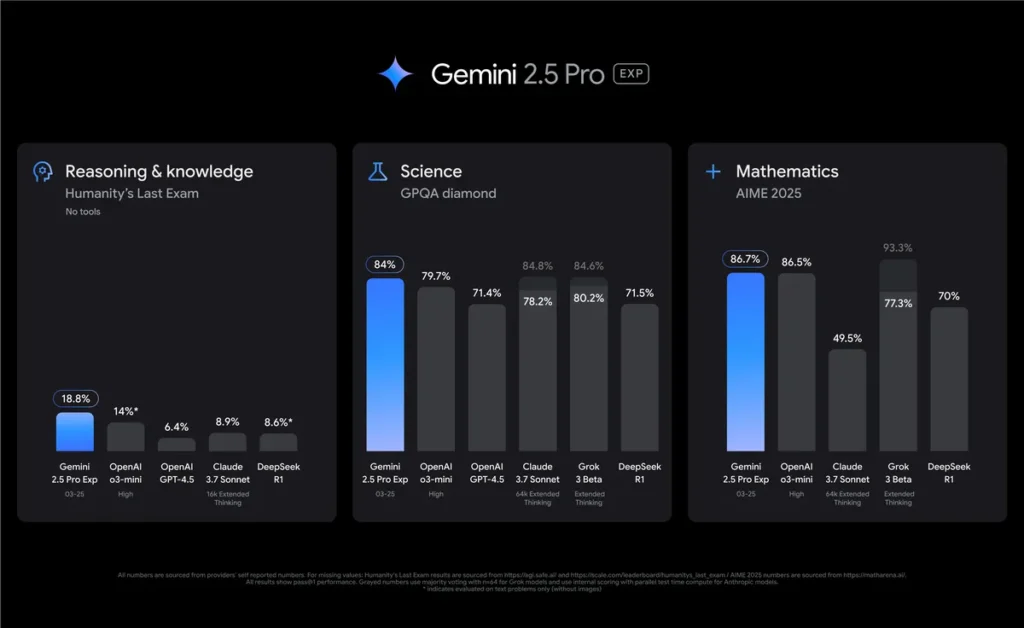
Gemini 2.5 Pro can process and reason across text and images, which makes it useful when your tasks extend beyond written prompts. You can analyze visual information alongside documents, compare different types of content and work through complex information within a single workflow.
Its integration with Google’s broader productivity and AI ecosystem adds another advantage. You can apply Gemini to multimedia analysis and information-heavy tasks while working across familiar Google services. These connections make the model especially practical when your existing workflow already relies heavily on Google tools.
Grok 4 is among the best AI models to consider when your work depends on timely information and conversations happening on X. Its connection with the platform can help you track public discussions, emerging trends, breaking developments and shifts in online sentiment. This real-time context can provide an advantage when recent information carries more value than static knowledge.
X also states that it may use public posts, profiles, user interactions, and inputs and results from Grok on X to train and fine-tune Grok and other generative AI models. This connection gives the system access to signals from active online conversations, although you should still verify important claims against reliable sources. For researchers and analysts, Grok can prove useful when understanding what people are discussing right now matters to the task.
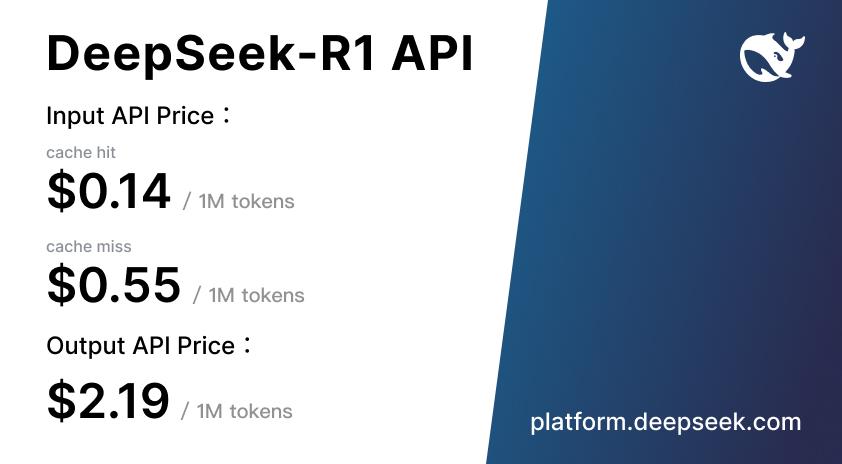
DeepSeek R1 focuses heavily on reasoning, making it well-suited to mathematics and technical problem-solving. Its support for context windows of up to 128,000 tokens also lets you work with lengthy documents, including research papers and legal contracts. These capabilities can help you analyze complex material while keeping relevant information available throughout the task.
R1 can appeal to developers and organizations seeking capable reasoning without relying entirely on premium proprietary models. Its open model availability gives you greater flexibility to customize deployments and integrate AI into specialized applications. This approach can also provide more control over how and where you run the model.
Relying on one AI model can limit your options when your workflow includes different types of tasks. Using multiple models lets you take advantage of specialized strengths while balancing quality and cost.
Competition in AI may focus on finding the right model for each workload rather than declaring one universal winner. AI agents and deeper tool integration can give you more options for building workflows around specific goals. As these capabilities expand, the best AI models may stand out by how effectively they handle particular tasks.
Rapid release cycles can also make your model selection an ongoing process. The number of major releases rose from 22 in 2023 to 88 in 2025, which increased the monthly release rate by 400%. For technology enthusiasts, these frequent changes make it important to regularly reassess which models offer the strongest capabilities for their needs.
No single model leads every category, so the best AI models for you depend on what you need to accomplish. Evaluate your most common tasks, required integrations and budget to determine which options fit your workflow. By understanding each model’s strengths, you can build more effective AI workflows and choose the right tool for each job.